When Curiosity Meets AI
Ever wondered what would happen if you handed your dream kitchen plans over to artificial intelligence?
I did — and let me tell you, it was equal parts amazing, ridiculous, and eye-opening.
Like most DIY-obsessed homeowners, I have a Pinterest board full of kitchen ideas that look like they were plucked straight out of a Nancy Meyers movie. But when I started planning a remodel, I wanted to see what today’s AI design tools could do. AI tends to get sensationalized. How many times have you heard “it’s going to take our jobs!” So, not surprisingly, my general feeling towards AI tools in the design world are some combination of curiosity and skepticism. But there are so many of them out there, and new ones emerging every day. I think the real opportunity for AI in the design world is to free up time and headspace so that more creative work can be done. So here is how my experiment with AI went… where it was useful (and where it was not).
Could AI really design a kitchen worth $50,000? Could it nail my personal style? Or would it spit out a futuristic robot lab full of neon lights and floating shelves that defy gravity?
Here’s what happened when I gave AI my budget and my wish list.
Step 1: Setting the Budget & the Rules
Before I unleashed AI on my future kitchen, I had to give it some ground rules:
Budget: $50,000 (mid- to high-range kitchen remodel)
Style: Modern farmhouse meets cozy designer vibes
Must-haves:
Large island with seating
Custom cabinetry
Quartz countertops
Statement lighting
Professional-grade range
Hidden storage solutions
Nice-to-haves:
Beverage fridge
Coffee bar
Walk-in pantry
Open shelving
I used a mix of AI-powered design tools:
RoomGPT for full-room renderings
Canva AI for mood boards
MidJourney for “dream kitchen” concept art
ChatGPT to help plan layouts, materials, and cost breakdowns
Step 2: The First AI Rendering — Love at First Sight… Almost
When I plugged everything into RoomGPT, I was ready to have my socks knocked off.
The first rendering popped up, and honestly? My jaw dropped.
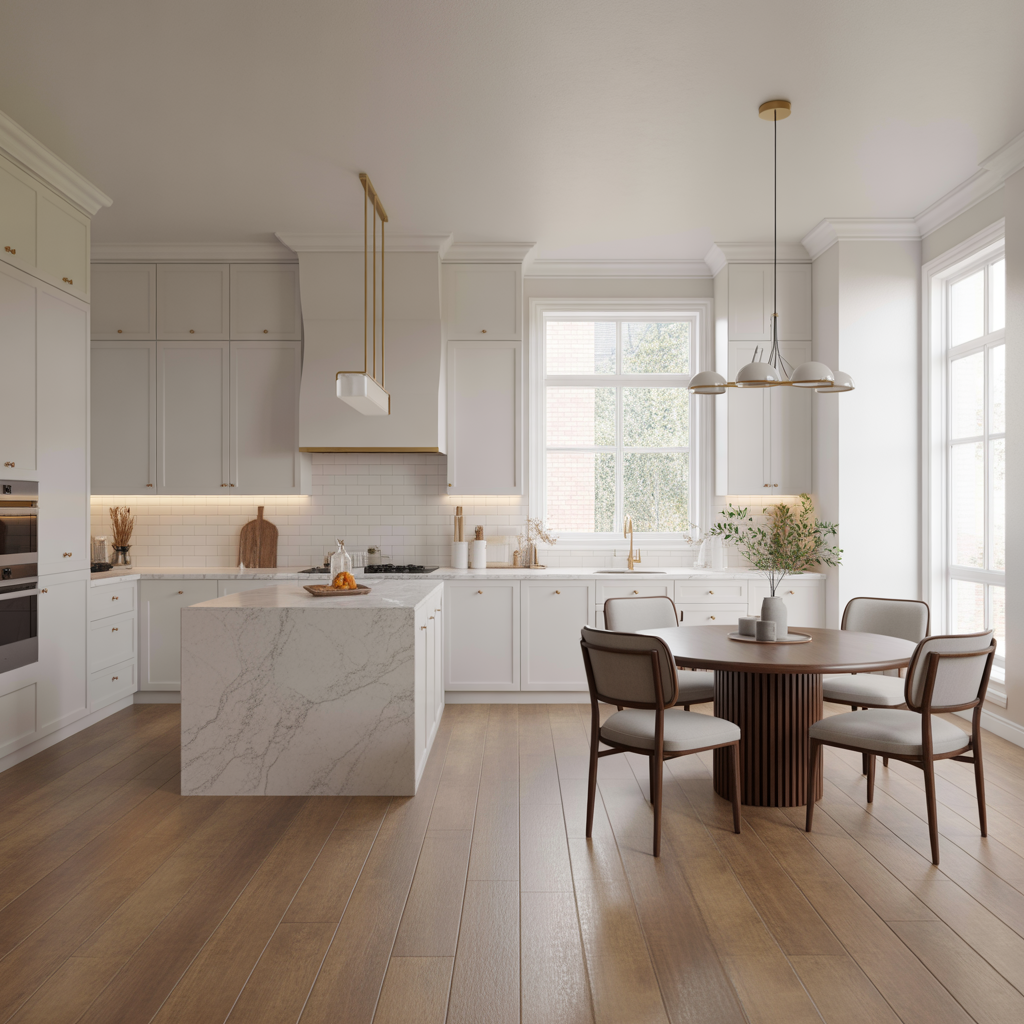
The wins: Gorgeous quartz waterfall island, natural white oak cabinetry, and soft brass accents.
The fails: AI apparently thinks I live in a mansion. The rendering had ceilings that were 14 feet high and a pantry the size of a small bedroom.
Learned AI tip: most AI design tools default to ideal proportions, not your real-life measurements. So I learned to feed AI tools the exact dimensions to avoid heartbreak!
Step 3: Playing With Layouts
Once I reined in the AI’s “let’s pretend you’re a millionaire” tendencies, I got serious about layouts.
I tested three options:
Layout A: The Social Hub
Massive center island with seating for six
Range and hood as the focal point
Hidden walk-in pantry tucked behind custom cabinetry
Open shelves flanking the hood
Verdict: Beautiful, but the pantry would eat too much square footage.
Layout B: The Chef’s Playground
Double islands: one for prep, one for seating
Wall-to-wall cabinetry with built-in fridge
Professional six-burner range
Beverage station tucked in the corner
Verdict: Amazing, but probably blows the $50K budget… by a lot.
Layout C: The Smart Compromise
One large island with a prep sink
Quartz counters + full-height quartz backsplash
Statement pendants over the island
Hidden appliance garage + pull-out spice racks
Verdict: Winner, winner, AI-designed dinner LOL!! It balances budget, function, and style perfectly.

Step 4: The AI Mood Board
Before finalizing the design, I wanted to see the vibe come together visually.
I used Canva’s AI-powered mood board generator to combine my inputs:
Cabinetry: Soft white uppers, natural white oak lowers
Countertops: Calacatta gold quartz
Hardware: Aged brass pulls + matte black faucet
Lighting: Oversized rattan pendants for warmth
Backsplash: Full-height quartz slab
Flooring: Wide-plank European oak
Result? A kitchen that felt elevated but cozy — modern yet timeless. Exactly what I wanted.
Step 5: The AI Shopping List
Here’s where AI surprised me the most: it actually built a shopping list based on the mood board and budget.
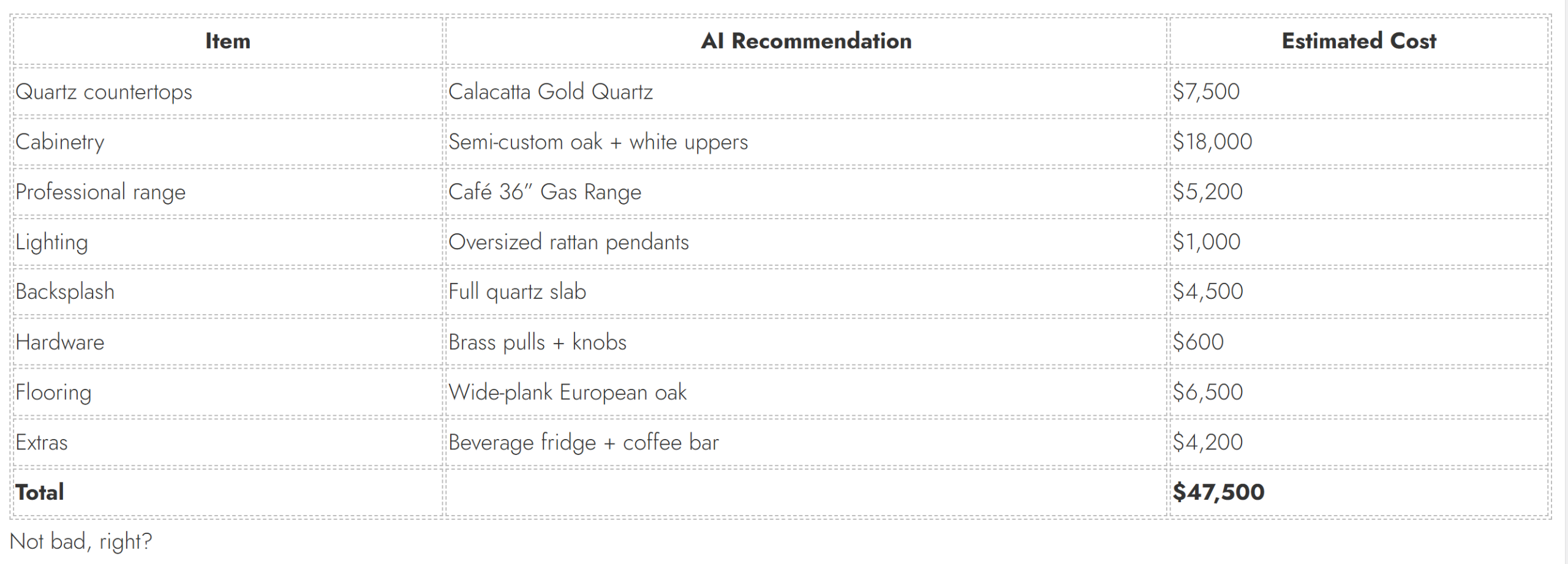
AI absolutely nailed some things:
Color palettes: Warm whites, natural woods, soft brass accents
Trend-awareness: Oversized pendants, hidden storage, quartz slabs — totally current
Budget balancing: It kept me close to $50K without sacrificing key features
Visualization: Seeing the kitchen rendered before lifting a hammer is a game-changer
Step 7: What AI Got Wrong
AI also reminded me why humans still rule design:
Scale issues: At first, it gave me a kitchen twice the size of my house
Lighting fails: One rendering had six pendants over a six-foot island — calm down, AI
Style mashups: At one point, it paired farmhouse cabinetry with ultra-modern LED floors. Absolutely not!
Missing personal touches: AI can’t yet capture the “lived-in” vibe that makes a home yours
Step 8: How to Use AI for Your Own Kitchen Remodel
Want to try this yourself? Here’s how:
1. Start With a Mood Board
Use tools like Canva, Pinterest Trends, or MidJourney to visualize your ideal vibe.
2. Test Room Layouts
Tools like RoomGPT or Planner 5D can help you see layouts in 3D.
3. Get Cost Estimates
Use AI-powered budgeting tools to avoid sticker shock. Even ChatGPT can give you ballpark pricing.
4. Experiment Fearlessly
AI lets you test wild ideas — open shelving walls, moody paint colors, double islands — without commitment.
5. Add Your Human Touch
Use AI for inspiration, but let your style, personality, and family needs guide the final choices.
Final Verdict: AI + DIY = Magic
AI didn’t design a perfect $50K kitchen, but it gave me a huge head start. It helped me:
Narrow down layouts
Visualize my options
Build a realistic shopping list
Feel confident in my budget and design choices
The best part? I had fun doing it. AI made the process feel creative and empowering — and even though I’ll make some tweaks, I now have a clear vision for my dream kitchen.
If you’re planning a remodel, AI isn’t here to replace your vision — it’s here to supercharge it.
Next Up
Thinking of using AI for your next DIY project? Here are a few ideas:
AI-powered paint color testers
Virtual room layout planners
Instant furniture style matching tools
AI-generated mood boards for any space